Building a headless docs interface
·3 min read
 Irsyad A. Panjaitan
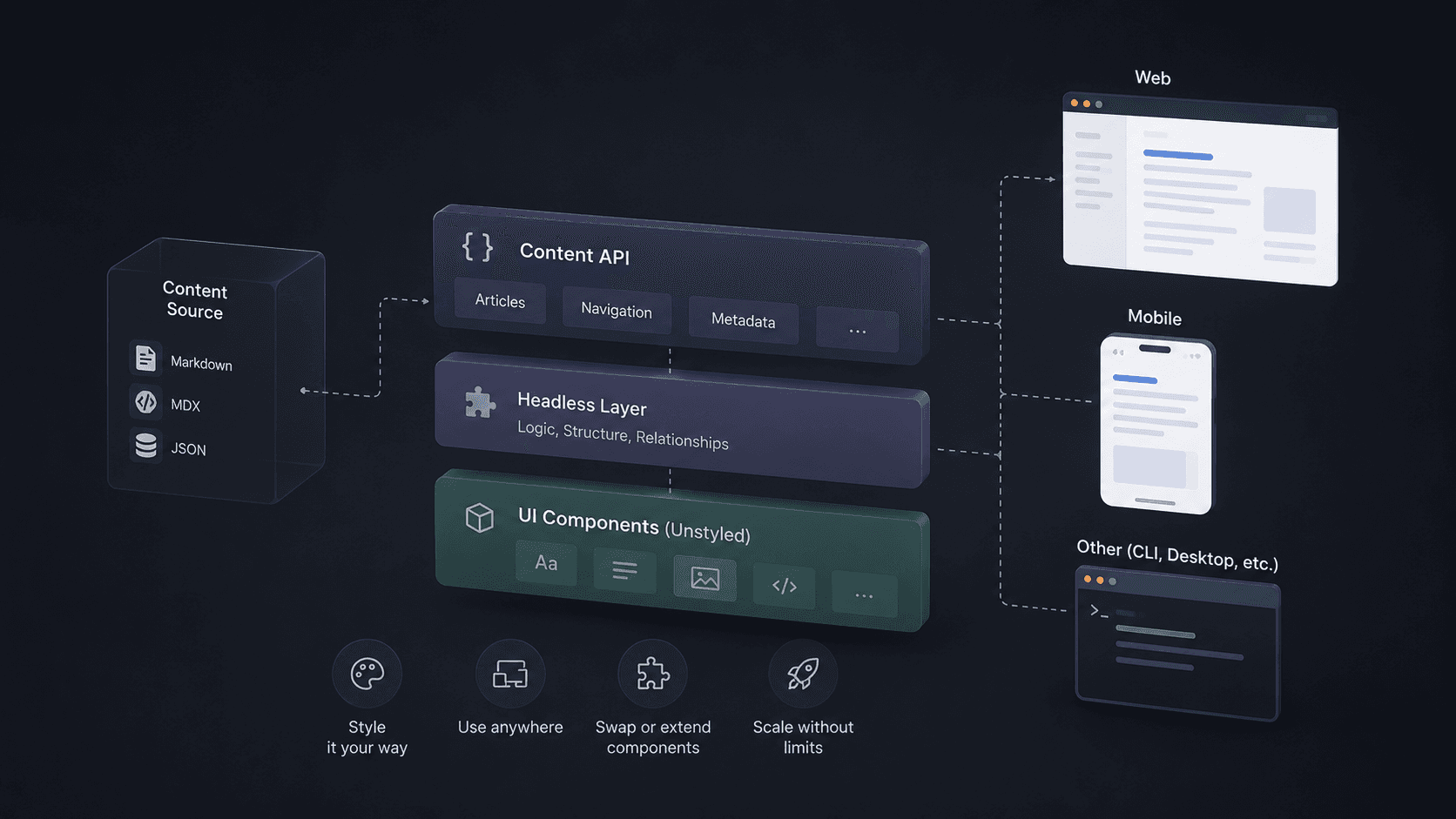
A packaged theme is useful until documentation becomes part of the product experience. Then teams need control over navigation, hierarchy, search, feedback, analytics, and product workflows.
Define the boundary
The content layer turns files into predictable data. The application layer decides how that data becomes an experience.
Model page data
A page model needs a URL, title, description, headings, raw source, structured metadata, and a loader for compiled content. Keep interface state out of it.
Keep contracts stable
Components should not know whether content came from MDX, a database, or an API. A stable contract allows the source to change without forcing a redesign.
Discover content
The engine needs a repeatable way to find pages and identify public URLs. File systems derive routes from directories; a CMS may provide explicit slugs.
Validate required fields
Fail early when titles, descriptions, authors, dates, or images are missing. Build-time validation turns content mistakes into actionable failures.
Normalize route data
Handle index files, nested paths, and renamed sections in one layer so navigation, metadata, and sitemap generation receive identical canonical URLs.
Compile rich content
MDX lets prose include components, but compilation remains an engine responsibility. The interface should receive content ready to render.
Control component access
Expose a deliberate component map instead of arbitrary imports. A smaller vocabulary improves consistency, security, portability, and maintenance.
Extract useful metadata
Collect headings for TOC, links for validation, plain text for search, and raw source for LLM endpoints. Perform this work once instead of parsing inside each interface.
Generate navigation
Navigation should combine discovered content with explicit editorial order. Alphabetical order is predictable but rarely represents a useful learning path.
Support editorial order
Use nearby metadata to group pages, name sections, and control sequence. Writers should be able to understand the visible structure without reading application code.
Separate navigation views
Desktop sidebars, mobile menus, command search, and pager links can consume the same tree while presenting interactions suited to their context.
Own the interface
The application controls typography, responsive layout, focus behavior, search presentation, feedback controls, and product-specific actions.
Design real states
Handle long titles, deep hierarchies, missing images, slow search, keyboard use, empty results, and narrow screens. Ownership means more than changing colors.
Add product context
Version selectors, account-aware examples, status notices, and links into the product can evolve without polluting the content engine.
Protect performance
Static content should remain static. Do not turn the full article into a client component because search, feedback, or TOC needs browser state.
Isolate client features
Render article content and metadata on the server. Hydrate only interactive controls. This preserves fast first paint and indexable HTML.
Optimize shared assets
Use framework image and font pipelines, preload only critical resources, and keep editor tooling out of the reader bundle.
Plan migrations
Test URLs, metadata, heading IDs, redirects, and search records as explicit compatibility surfaces.
Preserve public URLs
Readers and search engines depend on existing links. Treat URL changes as migrations requiring redirects, not as folder cleanup.
Test the contract
Add focused tests for discovery, validation, routes, heading extraction, and navigation order. Interface tests can concentrate on rendering and interaction.
Keep ownership clear
The engine reliably models knowledge while the application deliberately shapes the experience. This separation gives each responsibility a clear home and lets both sides evolve independently.